Assigning another grid to an existing facies-, rock- or function-based property model
On the Create Model form of the Facies Modeling, Rock Property Model and Function-based Property Modeling workflows, you can assign a new 3D grid to an existing Facies-, Rock, and Function-based Property Model, without having to set up the model from scratch. Existing workflow settings are maintained for all VOIs that keep the same name after the grid change.
As explained in The Facies Modeling workflow and The Rock Property Modeling workflow, VOI names are based on the discrete property classes of the property selected under 'Volume definition' in combination with the nesting property (if selected under 'Nest classes from') on the Create Model form. This means that if you select properties with identical property classes (and keep any nesting selections similar as well), the VOIs of the new grid will have identical names and as such will adopt the existing workflow settings after 'Apply/OK' of the Create Model form. You can then immediately proceed to the Run Model form, running the model with the new grid without having to go through each of the workflow steps.
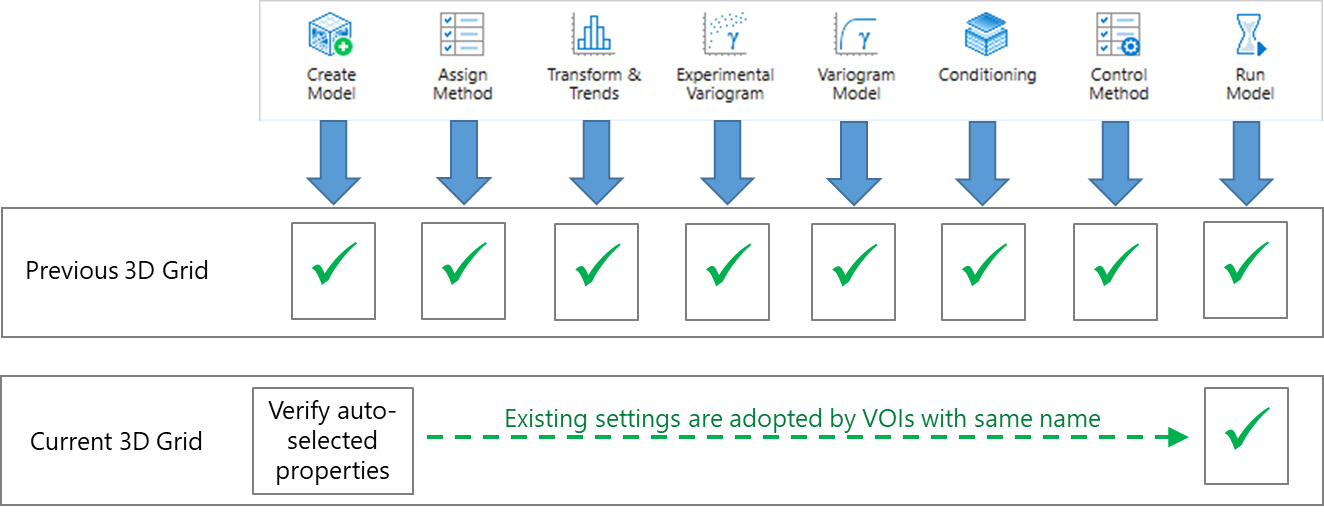
Existing workflow settings are automatically applied to the VOIs of the new grid when these VOIs keep the same name. click to enlarge
Auto-selection of properties
When you select another grid from the 'Grid' drop-down list, the application automatically searches the properties of the new grid for similar property names. When these properties exist, they are auto-selected for 'Upscaled property', 'Volume definition' and 'Nest classes from'. If the application cannot find a property with the same name a warning appears behind the respective selection field. For 'Volume definition' and 'Nest classes from', if the application finds a property with the same name but with different property classes, a different warning appears. For 'Upscaled property', if the application finds a property with the same name but based on a different log set or log type, also a dedicated warning appears. It is important to review these warnings before clicking Apply or OK on the form.
Recommendations
When a property is auto-selected this is indicated with a blue info-icon on the form. Verify each auto-selected property. The following is recommended:
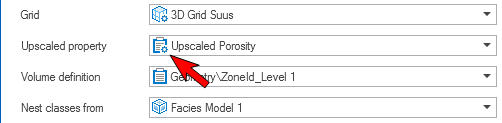
- (Not applicable to Function-based Property Models) For 'Upscaled properties' it is recommended that you used the same log set as for the previous grid, and upscaled it to the new grid with the Upscale Well Log form. When a log set is upscaled to the grid selected under 'Grid', this is indicated with a cogwheel on the property symbol, see image below.
- For 'Volume definition' and 'Nest classes from' it is recommended that the properties of the new grid have the same property classes as the properties of the previous grid. When property classes are different, this results in different VOIs. Only VOIs with the same name can adopt existing settings; VOIs with new names will not have any settings (you will have to go through each of the workflow steps and assign settings).